
Appearance
Integrations
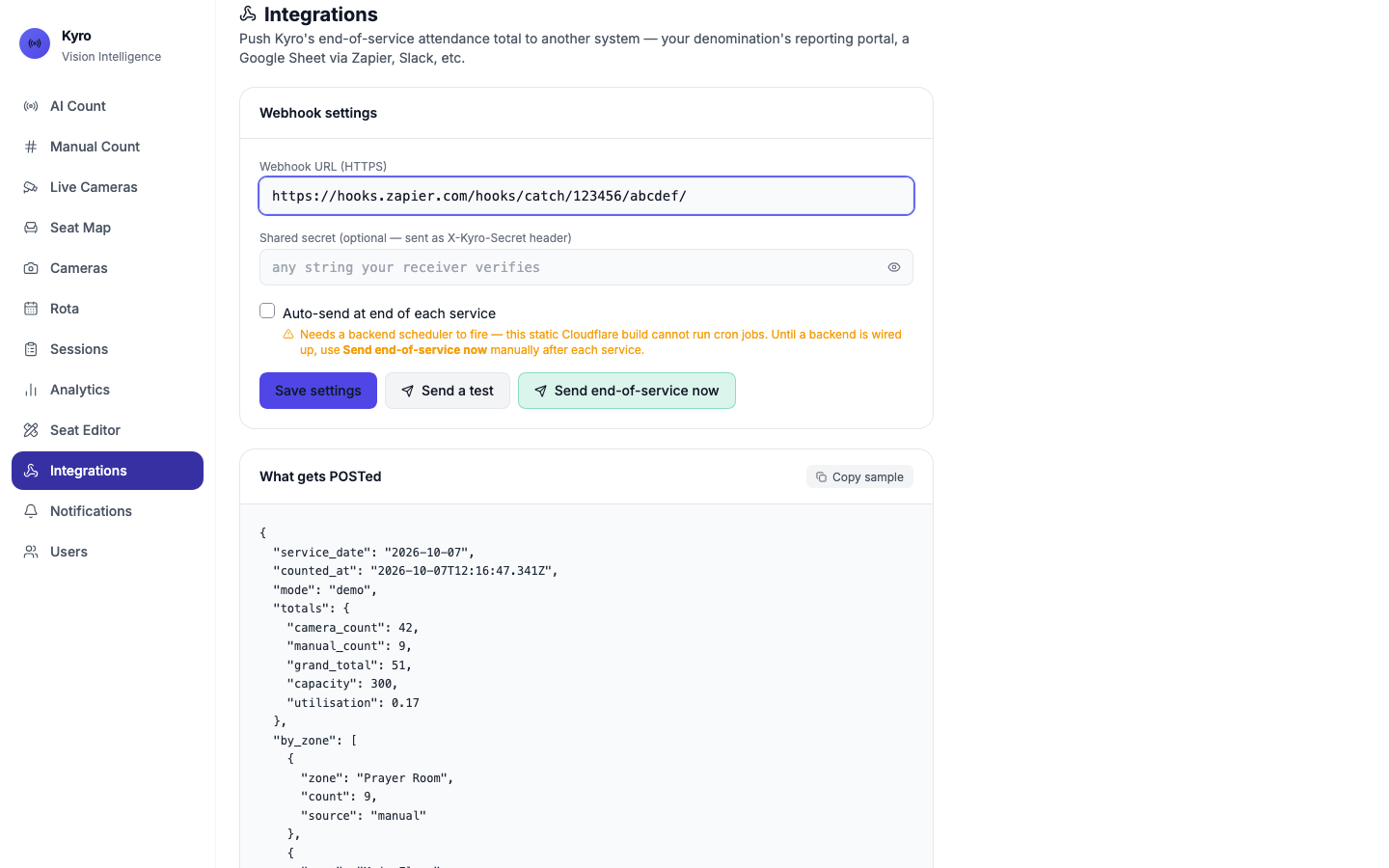
Integrations sends Kyro's end-of-service attendance total to another system: your denomination's reporting portal, a Google Sheet through Zapier, or anything else that accepts a webhook.
Connect a system
- In the other system, create a webhook and copy its URL. In Zapier, use Webhooks by Zapier → Catch Hook.
- In Kyro, paste it into Webhook URL (HTTPS).
- Optional: add a Shared secret. Kyro sends it as an
X-Kyro-Secretheader so the receiver can check the data came from you. - Tap Save settings.
- Tap Send a test. You should see Sent successfully: Test payload accepted by the receiver.
Just want to see it working?
Paste a fresh address from webhook.site, tap Send a test, and watch it arrive there.
After each service
- On Manual Count, tap Approve final count.
- Open Integrations and tap Send end-of-service now.
Only approved counts are sent
Draft manual counts aren't included. Approve them first.
Auto-send
The Auto-send at end of each service option needs the Kyro server running a schedule. Until that's set up, the page shows a warning. Use Send end-of-service now after each service.
What Kyro sends
The What gets POSTed card shows a live sample, and Copy sample copies it. It looks like this:
json
{
  "service_date": "2026-10-05",
  "counted_at": "2026-10-05T11:30:00.000Z",
  "mode": "live",
  "totals": {
    "camera_count": 42,
    "manual_count": 35,
    "grand_total": 77,
    "capacity": 300,
    "utilisation": 0.257
  },
  "by_zone": [
    { "zone": "Balcony", "count": 35, "source": "manual" },
    { "zone": "Main Floor", "count": 42, "source": "camera" }
  ],
  "source": "kyro",
  "kyro_version": "0.2.0",
  "test": true
}| Field | Meaning |
|---|---|
service_date | The day of the service |
counted_at | When it was sent |
mode | demo or live, so test data never gets mixed up with real data |
totals | Camera count, approved manual count, grand total, capacity and how full (0–1) |
by_zone | Each room's count, and whether it came from a camera or a manual count |
test | Only present on Send a test sends. Test sends use a sample camera count of 42 so you can spot them. |
If a send fails
| Message | What to do |
|---|---|
| Receiver returned 404 (or another number) | The URL is wrong, or the receiver rejected it. Copy the URL again from the other system. |
| URL must start with https:// | Check you pasted the whole address. |
| Private / local addresses can't be reached | Kyro sends from the cloud, so it can't reach an address on your church network. Use an internet address. |
Demo and Live each keep their own webhook settings, so testing in Demo never sends to your real system.